React1

React1

[TOC]

1.三个API

  • React.createElement(): 创建React元素

    React.createElement(type,[props],[…children])

    第一个参数:元素的名称(小写:div)

    第二个参数:元素的属性({id:’btn’}),使用对象形式

    ​ 在设置事件的时候,属性名需要修改为驼峰命名法,并且在后面不能写方法,只能写函数名,React帮你调方法。

    ​ class需求使用className来代替。

    第三个参数:元素内容

    用来创建React元素
    React元素无法更改,使用新创建的元素进行替换。

  • ReactDOM.createRoot():获取React根元素

    createRoot(container[,options])
    用来 创建React根容器,放置React元素。

  • root.render()

    root.render(element)
    当首次调用时,容器节点的所有DOM元素都会被替换,后续调用就会进行比较,只修改有变化的DOM。
    不会修改容器节点,只会修改容器子节点。可以在不覆盖现有子节点情况下,将组件插入已有的DOM节点。

    当后续调用render渲染页面的时候,React会比较两次渲染的元素,只有在真是DOM发生变化的才会更新,没有变化的保持不变。

例子:

1
<div id="root"><div>
1
2
3
4
5
6
7
8
// 创建React 元素
const btn = React.createElement("button",{},"点击");

// 获取根元素
const root = ReactDOM.createRoot(document.getElementById("root"));

// 将新建的React元素放到根元素里面去
root.render(btn);

2. JSX

在React中可以通过JSX来创建React元素。

JSX需要被React翻译为JS,才能被React执行。(使用Babel来翻译)

JSX其实就是React.createElement()的语法糖。

2.1 JSX注意事项

  1. 不要加引号,错误:“

    12
    >”

  2. 有且只有一个根标签,必须有一个根标签。

  3. html标签小写开头,React组件标签大写开。

  4. 可以使用{}插入js表达式。

  5. 属性正常写(class –> className;style –> {};事件名大驼峰)。

  6. 标签必须闭合。

  7. {}中的布尔类型,null,undefined会被忽略。

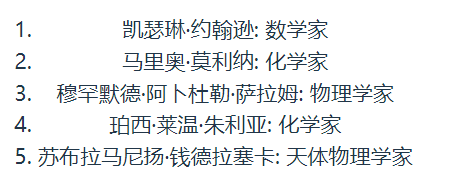
2.2 JSX中列表渲染

使用map

1
2
3
4
5
6
7
8
9
10
11
12
13
    const arr = [
{ name: '凯瑟琳·约翰逊: 数学家', key: 1 },
{ name: '马里奥·莫利纳: 化学家', key: 2 },
{ name: '穆罕默德·阿卜杜勒·萨拉姆: 物理学家', key: 3 },
{ name: '珀西·莱温·朱利亚: 化学家', key: 4 },
{ name: '苏布拉马尼扬·钱德拉塞卡: 天体物理学家', key: 5 },
];

<ol>
{arr.map((item) => {
return <li key={item.key}>{item.name}</li>
})}
</ol>

image-20230803143441470

3.虚拟DOM

在React中操作的元素叫做React元素,并不是真正的原生DOM。

React通过虚拟DOM将React元素与真实DOM进行映射。

好处:

  1. 降低API复杂度
  2. 解决兼容问题
  3. 提升性能(减少不必要的DOM操作)

React使用diffing算法,将新旧DOM进行比较,替换更改的DOM,保留不变的DOM。

比较时,React会先比较父元素,如果父元素发生了改变,就直接替换该元素,不再比较子元素。如果父元素一致,则往下比较,直到发现不一样的节点。

4. 组件

4.1 函数式组件

适用于简单组件

1
2
3
4
5
6
7
export default function Hello() {
return (
<>
<div>Hello React!</div>
</>
)
}

在父组件引入挂载。

函数式组件,在没有hooks之前:

  1. 没有生命周期,但是会被更新并挂载
  2. 没有this(组件实例)
  3. 没有内部状态

4.2 类式组件

1
2
3
4
5
6
7
8
9
import React from 'react'

export default class ClassCom extends React.Component {
render() {
return (<>
<div>类组件</div>
</>)
}
}

其中render函数位于类实例上。

当这个类组件被root.render解析的时候,发现这个组件是一个类组件,所以就帮你创建了一个当前组件的实例,随后调用该组件上的render方法。

最后将root.render返回的虚拟DOM转为真实DOM,展现到网页上。

4.3 补充

render函数可以:

  • 返回React元素:

通过JSX创建

  • 数组或者fragments、

使得render返回多个元素

  • Portals:

渲染子节点到不同的DOM字树中

  • 字符串或者数值类型:

在DOM中被渲染为文本节点

  • 布尔类型或者null:

什么都不渲染

5. React中的生命周期

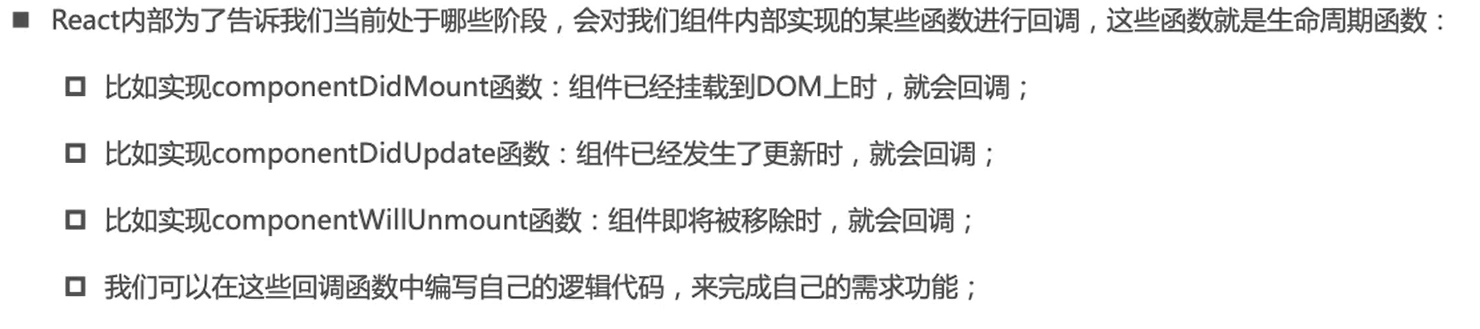
image-20230803165508423

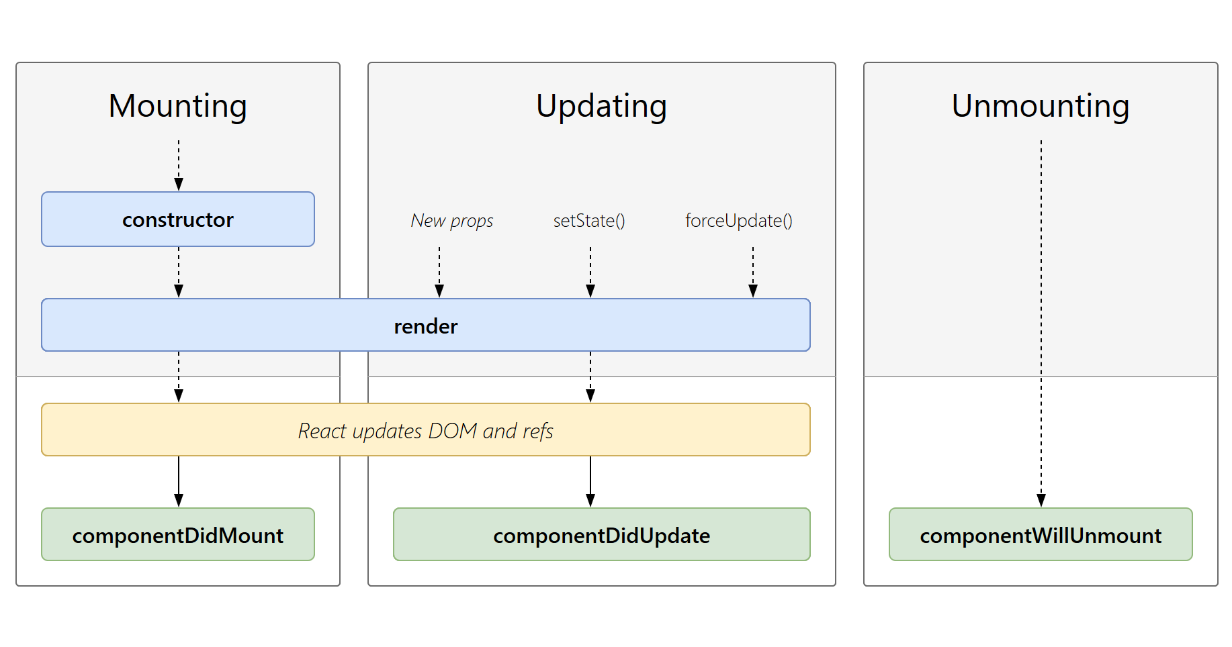
5.1 生命周期解析

image-20230803165803615

  • Mounting:挂载阶段
  • Updating:更新阶段
  • Unmounting:卸载阶段
1
2
3
4
5
6
7
8
9
10
11
12
13
14
15
16
17
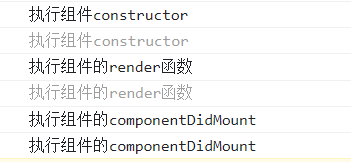
import React from 'react'

export default class ClassCom extends React.Component {
constructor() {
super();
console.log("执行组件constructor");
}
render() {
console.log("执行组件的render函数");
return (<>
<div>类组件</div>
</>)
}
componentDidMount() {
console.log("执行组件的componentDidMount");
}
}

image-20230803170826951

在组件更新的时候,会调用componentDidUpdate生命周期函数;当组件卸载的时候,会调用componentWillUnmount方法。

  1. Constructor:

    ​ 通过this.state赋值对象来初始化内部的state

    ​ 为事件绑定this。

  2. componentDidMount:

    ​ 依赖DOM的操作在这里执行

    ​ 在此处发送网络请求

    ​ 添加订阅

  3. componentDidUpdate:

    ​ 当组件更新后,在此处对DOM进行操作

    ​ 如果更新前后props进行了比较,可以在此处网络请求

  4. componentWillUnmount:

    ​ 在此方法中执行必要清理操作

    ​ 比如:timer,网络请求,创建的订阅

6. 组件间的通信

6.1 父子组件之间的通信

6.1.1 父传子

使用props

  • 类式组件

父组件:

1
2
3
4
5
6
7
8
9
10
11
12
13
14
15
16
17
import React from 'react'
import ClassSon from './ClassSon';

export default class ClassCom extends React.Component {
constructor() {
super();
this.state = {
age: 12.
}
}
render() {
return (<>
<div>类组件</div>
<ClassSon age={this.state.age}></ClassSon>
</>)
}
}

子组件:

1
2
3
4
5
6
7
8
9
10
11
12
13
14
15
import React from "react";

export default class ClassSon extends React.Component {
constructor(props) {
super(props);
}

render() {
const { age } = this.props
return (<>
<div>我是类式组件的子组件</div>
<div>{age}</div>
</>)
}
}

结果:

image-20230804090700448

  • 函数式组件

父组件

1
2
3
4
5
6
7
8
import FunSon from "./FunSon"

export default function FunF() {
return (<>
<div>函数式组件</div>
<FunSon name={"hmbb"}></FunSon>
</>)
}

子组件

1
2
3
4
5
6
export default function FunSon(props) {
const { name } = props;
return (<>
<div>子组件{name}</div>
</>)
}

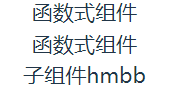
结果:

image-20230804093205321

  • 对传递过来的属性进行验证:

当传过来的数据类型与期望类型不一致的时候,就会报错,这个时候就需要对传递的数据类型进行验证。

使用PropTypes进行验证。

从React15.5开始,这个功能被移入了prop-types库。(使用时需要单独引入)

1
2
3
4
5
6
7
8
9
10
11
12
import PropTypes from "prop-types"

export default function FunSon(props) {
const { name } = props;
return (<>
<div>子组件{name}</div>
</>)
}

FunSon.PropTypes = {
name: PropTypes.string.isRequired, // 表示必传且数据类型为字符串
}

我们还可以设置属性的默认值,当父组件没有传递任何值的时候,子组件就会使用默认值进行渲染。

1
2
3
FunSon.defaultProps = {
name:'pdx'
}

上面的属性验证写法,类组件同样使用,使用组件名.方法。

在类组件中还有另外一种写法:

1
2
3
4
5
6
7
8
class Class extends React.Component{
static propTypes = {

}
static defaultProps = {

}
}

6.1.2 字传父

在React中通过Props传递消息,父组件给子组件传递一个回调函数,子组件调用。

父组件:

1
2
3
4
5
6
7
8
9
10
11
12
13
14
15
16
17
18
19
20
21
22
23
24
25
26
import React from "react";
import ClassSon from "./ClassSon";

export default class ClassF extends React.Component {
constructor(props) {
super(props);

this.state = {
count: 0
}
}

render() {
return (<>
<div>当前计数{this.state.count}</div>
<ClassSon click={this.add.bind(this)}></ClassSon>
</>)
}

add() {
console.log(this.state);
this.setState({
count: this.state.count + 1
})
}
}

子组件

1
2
3
4
5
6
7
8
9
10
11
12
13
14
import React from "react";

export default class ClassSon extends React.Component {
constructor(props) {
super(props);
}

render() {
const { click } = this.props
return (<>
<button onClick={click}>+1</button>
</>)
}
}

父组件定义方法,并且通过props的方法将事件传递给子组件,子组件再进行调用。

6.2 如何在React中实现Vue中的slot

  • 方式一

使用props.children给子组件传递组件数据。

父组件:

1
2
3
4
5
6
7
8
9
10
11
12
13
14
export default class Slot extends React.Component {
constructor(props) {
super(props);
}
render() {
return (<>
<NavBar>
<div>1212</div>
<div>center</div>
<div>right</div>
</NavBar>
</>)
}
}

使用类式组件,将子组件引入,并且在子组件内部写上要传递的数据,这里有三个部分,到时候props.children中也会有三个数据。

子组件:

1
2
3
4
5
6
7
8
9
10
11
12
13
14
15
16
17
18
19
20
21
export default class NavBar extends React.Component {
constructor(props) {
super(props)
console.log(this.props);
}
render() {
return (<>
<div className="nav-bar">
<div className="nav-left">
{this.props.children[0]}
</div>
<div className="nav-center">
{this.props.children[1]}
</div>
<div className="nav-right">
{this.props.children[2]}
</div>
</div>
</>)
}
}

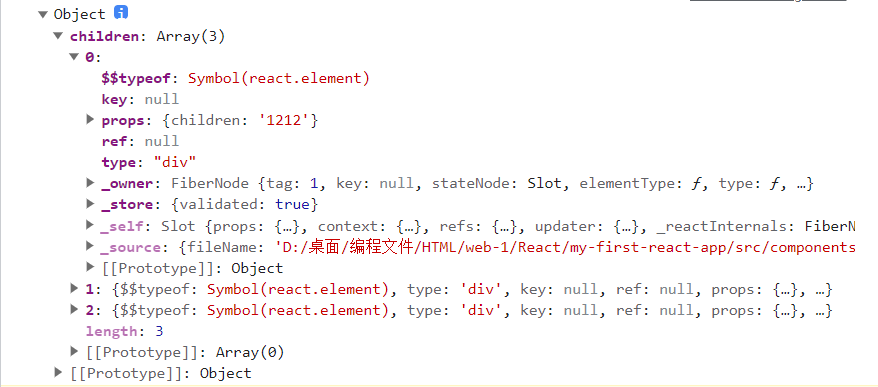
控制台输出子组件中的props为:

image-20230807104525285

可以看到确实children中有我们组件的数据。

  • 方式二

将父组件中子组件内部的数据通过props传递:

image-20230807105633832

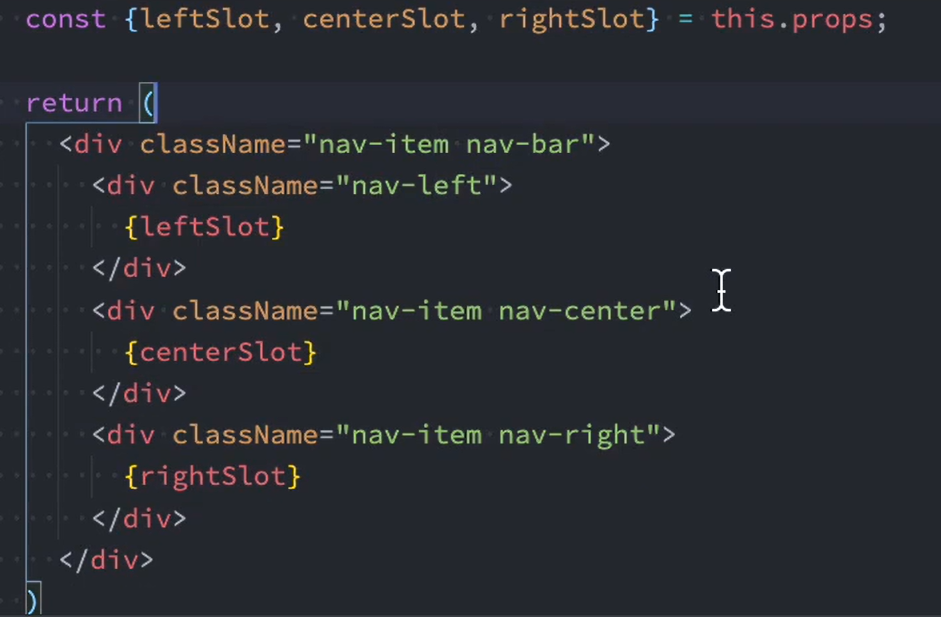
在子组件中使用对象解构,将对应的插槽给解构出来:

image-20230807105739216

实现的效果是一样的。

6.3 跨组件通信

6.3.1 使用props进行祖先组件通信

1
2
3
4
5
6
7
8
9
10
11
12
13
14
15
16
17
18
19
20
21
22
23
24
25
26
27
28
29
30
31
32
33
34
35
36
37
38
39
40
41
42
43
import React from 'react';
// 父组件
export default class TxProps extends React.Component {
constructor(props) {
super(props)
this.state = {
name: "海绵宝宝",
age: 12,
}
}
render() {
return (<>
<Son1 name={this.state.name} age={this.state.age}></Son1>
</>)
}
}
// 子组件
class Son1 extends React.Component {
constructor(props) {
super(props);
console.log("son1:", this.props);
}
render() {
const { name, age } = this.props;
return (<>
<Son2 name={name} age={age}></Son2>
</>)
}
}
// 孙组件
class Son2 extends React.Component {
constructor(props) {
super(props);
console.log("son2:", this.props);
}
render() {
const { name, age } = this.props
return (<>
<div>name:{name}</div>
<div>age:{age}</div>
</>)
}
}

使用props逐层传递。

这种方法对于中间层(Son1)它根本不需要这些数据,这样就会造成性能的浪费以及后期维护成本的增加。

所以第二种方法:

6.3.2 Context实现非父子组件数据通信

Context相关API

  • 创建Context对象

React.createContext()

​ 创建一个需要共享的Context对象,如果某个组件订阅了Context,那么该组件就会寻找离自身最近的那个Provider并且读取到当前context的值。

​ defaultValue是组件在顶层查找中没有找到对应的Provider,那么就使用默认值。

1
const MyContext = React.createContext(defaultValue);
  • Context.Provider

​ 每个Context对象都会返回Provider 组件,这个组件允许消费组件(使用该数据的组件)订阅Context组件的变化。

​ Provider接受一个value属性,并且将这个值传递给消费组件

​ 一个Provider组件允许被多个消费组件使用

​ Provider组件可以被嵌套使用,里层的数据会覆盖外层的数据

​ 当Provider中value发生变化,所以依赖该Provider组件的消费组件都会被重新渲染(更新)。

1
<MyContext.Provider value={"value"}/>
  • Class.contextType

​ 挂载在class上的contextType属性会被重新赋值为一个由React.createContext()创建的Context对象。

​ 在该类组件可以使用this.context来消费最近的Context那个值

​ 可以在任何声明周期内方法,包括render函数

1
MyClass.contextType = MyContext;
  • Context.Consumer

​ React订阅组件的变更

​ 将函数作为子元素

​ 该函数接受当前context的值,返回react节点

1
2
3
4
5
6
7
8
9
10
11
12
13
14
15
16
17
18
19
20
21
22
23
24
25
26
27
28
29
30
31
32
33
34
35
36
37
38
39
40
41
42
43
44
45
46
47
48
49
50
51
52
53
54
55
56
57
58
59
import React from 'react';

// 创建Context对象,并且设置默认值
const UserContext = React.createContext({
name: "defaultName",
age: "undefaultAge"
})

export default class ContextProps extends React.Component {
constructor(props) {
super(props)
this.state = {
name: "海绵宝宝",
age: 12,
}
}
render() {
return (<>
{/* 使用Context.Provider */}
<UserContext.Provider value={this.state}>
<Son1></Son1>
</UserContext.Provider>
</>)
}
}

class Son1 extends React.Component {
constructor(props) {
super(props);
}
render() {
return (<>
<Son2></Son2>
</>)
}
}


class Son2 extends React.Component {
constructor(props) {
super(props);
}
render() {
console.log(this.context);
return (<UserContext.Consumer>
{
value => {
return (<>
<div>name:{value.name}</div>
<div>age:{value.age}</div>
</>)
}
}
</UserContext.Consumer>)
}
}

// 一定要放在组件之后
Son2.contextType = UserContext;

7. setState

在上面的代码中,我们使用this.state={}的方式在类式组件里面定义了数据,如果我们直接修改里面的数据:

1
2
3
4
5
this.state = {
name:"12",
}

this.state.name = "海绵宝宝";

这样的操作确实把数据给更改了,但是页面不会更新,因为React察觉不到数据是否发生了改变。

7.1 setState是异步更新

也就是我们通过setState将数据更改之后,数据并不会立即发生改变,而是等到所有的数据都更新之后,才会将数据传递给页面,页面重新渲染,如果我们在setState之后立即输出该数据,我们会发现数据是没有变化的。

1
2
3
4
5
6
7
8
9
10
11
12
13
14
15
16
17
18
19
20
21
22
23
24
import React from 'react';

export default class SetState extends React.Component {
constructor(props) {
super(props);
this.state = {
name: "121212",
}
}

change() {
this.setState({
name: "海绵宝宝"
})
console.log(this.state.name);
}

render() {
return (<>
<div>当前数据:{this.state.name}</div>
<button onClick={e => this.change()}>更改数据</button>
</>)
}
}

点击之后,页面更新:

image-20230807150454145

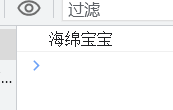
但是控制台输出的结果确实更新之前的数据:
image-20230807150522490

  • 获取更新之后的数据

方式一:在setState回调函数中获取

在setState方法里面有两个参数,setState(更新的state,回调函数)

1
2
3
4
5
6
7
change() {
this.setState({
name: "海绵宝宝"
},() => {
console.log(this.state.name)
})
}

此时拿到的数据就是更新之后的数据:

image-20230807151434215

方拾二:通过生命周期获取componentDidUpdate

1
2
3
componentDidUpdate() {
console.log(this.state.name);
}

同样可以拿到更新之后的数据。

相较于方法一,方法二比方法一更早执行,也就是先执行生命周期,后面再执行setState的回调函数。

注意:

setState在以下两种情况时同步的:

  1. setTimeout事件中
  2. 原生的DOM事件中

8.React的更新机制

  • React 的渲染流程: JSX → 虚拟 DOM → 真实 DOM

  • React 的更新流程: props/state 改变 → render 函数重新执行→产生新的 DOM 树→新旧 DOM 树进行 diff→ 计算出差异进行更新→更新到真实的 DOM